

 3D
Project guides
Digital tape measure
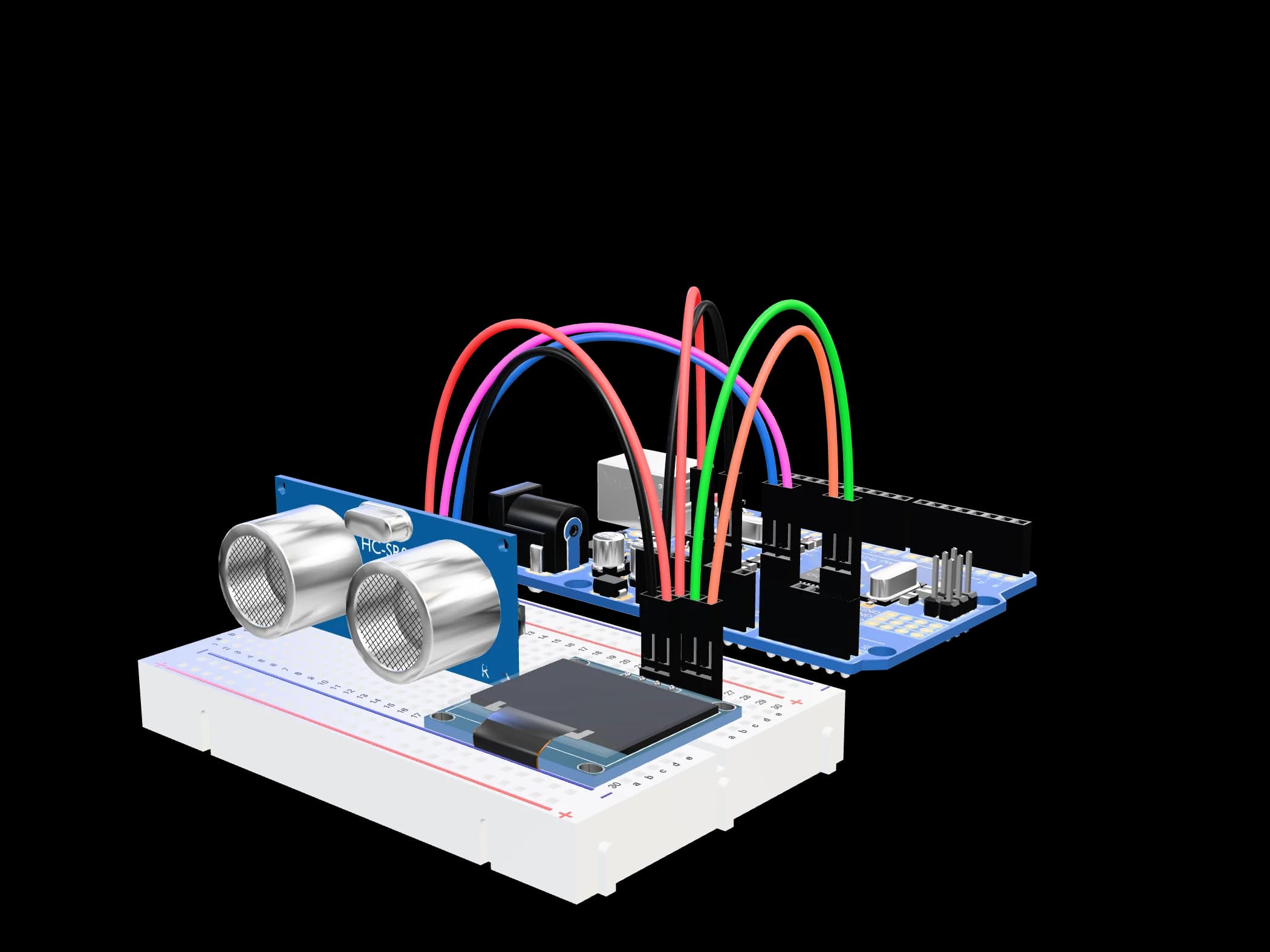
An ultrasonic sensor measures the distance and an OLED screen shows it in centimetres. Built in an evening, and genuinely useful at home.
- Difficulty
- Easy
- Time
- ~60 min
- Parts
- 5 parts
- Step by step
- 4 steps
- Driving an I²C display
- Measuring distance with ultrasound and smoothing the result
- Building on a breadboard
Parts
You'll also need
- — A computer with the Arduino IDE (free from arduino.cc)
- — A USB cable for the UNO (the UNO SMD “+ USB cable” option)
- — A small Phillips screwdriver
Step by step
- 01
Lay it out on the breadboard
Plug the HC-SR04 and the OLED into the breadboard. Run the UNO's 5V and GND to the power rails — both modules feed from them.
- 02
Wire it
OLED: SDA → A4, SCL → A5. HC-SR04: TRIG → D12, ECHO → D11.
- 03
Install the libraries
In the Arduino IDE open the Library Manager and install “Adafruit SSD1306” (accept when it offers “Adafruit GFX” too).
- 04
Upload, then take it with you
Upload — the distance appears on the screen. The tape runs from the UNO's USB port: unplug it from the computer, plug the cable into any power bank, and it works anywhere.
Wiring
- Power (+)
- Ground (−)
- Signal pin
- I²C / SPI bus
- OLEDVCC→UNO5V
- OLEDGND→UNOGND
- OLEDSDA→UNOA4
- OLEDSCL→UNOA5
- HC-SR04VCC→UNO5V
- HC-SR04GND→UNOGND
- HC-SR04TRIG→UNOD12
- HC-SR04ECHO→UNOD11
- USB cable→Computer or power bank
The code
sketch.ino
#include <Wire.h>
#include <Adafruit_GFX.h>
#include <Adafruit_SSD1306.h>

Adafruit_SSD1306 oled(128, 64, &Wire, -1);
const int TRIG = 12, ECHO = 11;

long readCm() {
  digitalWrite(TRIG, LOW);  delayMicroseconds(2);
  digitalWrite(TRIG, HIGH); delayMicroseconds(10);
  digitalWrite(TRIG, LOW);
  long us = pulseIn(ECHO, HIGH, 25000);
  return us ? us / 58 : -1;
}

// the middle of five readings: one stray echo can't spoil the number
long measure() {
  long r[5];
  for (int i = 0; i < 5; i++) { r[i] = readCm(); delay(15); }
  for (int i = 0; i < 4; i++)
    for (int j = i + 1; j < 5; j++)
      if (r[j] < r[i]) { long t = r[i]; r[i] = r[j]; r[j] = t; }
  return r[2];
}

void setup() {
  pinMode(TRIG, OUTPUT); pinMode(ECHO, INPUT);
  oled.begin(SSD1306_SWITCHCAPVCC, 0x3C);   // try 0x3D if the screen stays dark
  oled.setTextColor(SSD1306_WHITE);
}

void loop() {
  long cm = measure();
  oled.clearDisplay();
  oled.setTextSize(1); oled.setCursor(0, 0);
  oled.print("Constell tape");
  oled.setTextSize(3); oled.setCursor(0, 22);
  if (cm < 2 || cm > 400) oled.print("---");
  else { oled.print(cm); oled.setTextSize(2); oled.print(" cm"); }
  oled.display();
  delay(150);
}
If something doesn't work
- The screen stays dark: try address 0x3D instead of 0x3C; check SDA/SCL are on A4/A5.
- The reading jumps: point the sensor square at the surface; it can't measure closer than 2 cm or beyond 4 m.
- It switches off on a power bank: some banks shut down when the current is this small — try another one.
Where to go from here
- Add a button to hold the reading
- Work out a room's area from two measurements